# Updating Consensus Client

## :rocket: Automated Updates

:pill:**Install** [**EthPillar**](https://www.coincashew.com/spanish/coins/overview-eth/ethpillar): a simple companion UI for node management!

Update your software with a keystroke.

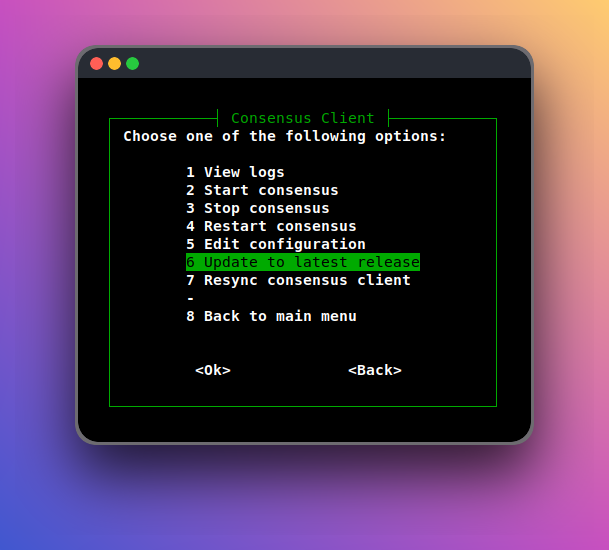
To update, navigate to

`EthPillar > Consensus Client > Update to latest release`

<figure><img src="https://content.gitbook.com/content/9KF47A90HRvVnkm4oDNF/blobs/sSXIr50eIY3CNOHWtLtC/cl-update.png" alt=""><figcaption><p>EthPillar Update</p></figcaption></figure>

## :fast\_forward: Manual Updates

When a new release is cut, you will want to update to the latest stable release. The following shows you how to update your beacon chain and validator.

{% hint style="warning" %}
Always review the **release notes** before updating. There may be changes requiring your attention.

* [Lighthouse](https://github.com/sigp/lighthouse/releases)
* [Lodestar](https://github.com/ChainSafe/lodestar/releases)
* [Teku](https://github.com/ConsenSys/teku/releases)
* [Nimbus](https://github.com/status-im/nimbus-eth2/releases)
* [Prysm](https://github.com/prysmaticlabs/prysm/releases)
  {% endhint %}

{% hint style="success" %}
:fire: **Pro tip**: Plan your update to overlap with the longest attestation gap. [Learn how here.](https://www.coincashew.com/spanish/coins/overview-eth/guide-or-how-to-setup-a-validator-on-eth2-mainnet/part-ii-maintenance/finding-the-longest-attestation-slot-gap)
{% endhint %}

## Step 1: Select your consensus client.

{% hint style="warning" %}
Staking setups prior to July 2023:

Using **beacon-chain** as the consensus client service name? [V1 update instructions available here.](https://www.coincashew.com/coins/overview-eth/archived-guides/guide-or-how-to-setup-a-validator-on-eth2-mainnet/part-ii-maintenance/updating-your-consensus-client)
{% endhint %}

### Lighthouse

<details>

<summary>Option 1 - Download binaries</summary>

Run the following to automatically download the latest linux release, un-tar and cleanup.

```bash
RELEASE_URL="https://api.github.com/repos/sigp/lighthouse/releases/latest"
BINARIES_URL="$(curl -s $RELEASE_URL | jq -r ".assets[] | select(.name) | .browser_download_url" | grep x86_64-unknown-linux-gnu.tar.gz$)"

echo Downloading URL: $BINARIES_URL

cd $HOME
# Download
wget -O lighthouse.tar.gz $BINARIES_URL
# Untar
tar -xzvf lighthouse.tar.gz -C $HOME
# Cleanup
rm lighthouse.tar.gz
```

Stop the services.

<pre class="language-bash"><code class="lang-bash"><strong>sudo systemctl stop consensus validator
</strong></code></pre>

Remove old binaries, install new binaries and restart the services.

<pre class="language-bash"><code class="lang-bash">sudo rm /usr/local/bin/lighthouse
<strong>sudo mv $HOME/lighthouse /usr/local/bin/lighthouse
</strong><strong>sudo systemctl start consensus validator
</strong></code></pre>

</details>

<details>

<summary>Option 2 - Build from source code</summary>

Build the binaries.

```bash
cd ~/git/lighthouse
git fetch --all && git checkout stable && git pull
make
```

:bulb:**Tip**: Improve some Lighthouse benchmarks by around 20% at the expense of increased compile time? Use `maxperf` profile.

* To compile with maxperf, replace the above `make` command with

```bash
PROFILE=maxperf make
```

In case of compilation errors, run the following sequence.

```bash
rustup update
cargo clean
make
```

Verify lighthouse was built properly by checking the version number.

```
lighthouse --version
```

Stop the services.

<pre class="language-bash"><code class="lang-bash"><strong>sudo systemctl stop consensus validator
</strong></code></pre>

Remove old binaries, install new binaries and restart the services.

<pre class="language-bash"><code class="lang-bash"><strong>sudo rm /usr/local/bin/lighthouse
</strong><strong>sudo cp $HOME/.cargo/bin/lighthouse /usr/local/bin/lighthouse
</strong>sudo systemctl start consensus validator
</code></pre>

</details>

### Lodestar

<details>

<summary>Option 1 - Build from source code</summary>

Pull the latest source and build Lodestar.

```bash
cd ~/git/lodestar
git checkout stable && git pull
yarn install
yarn run build
```

:warning: In case of build errors or missing dependencies, run the following command.

```bash
yarn clean:nm && yarn install
```

Verify Lodestar was installed properly by displaying the version.

```bash
./lodestar --version
```

Sample output of a compatible version.

```
🌟 Lodestar: TypeScript Implementation of the Ethereum Consensus Beacon Chain.
  * Version: v1.8.0/stable/a4b29cf
  * by ChainSafe Systems, 2018-2022
```

Stop the services.

<pre class="language-bash"><code class="lang-bash"><strong>sudo systemctl stop consensus validator
</strong></code></pre>

Remove old binaries, install new binaries and restart the services.

```bash
sudo rm -rf /usr/local/bin/lodestar
sudo cp -a $HOME/git/lodestar /usr/local/bin/lodestar
sudo systemctl start consensus validator
```

</details>

### Teku

<details>

<summary>Option 1 - Download binaries</summary>

Run the following to automatically download the latest linux release, un-tar and cleanup.

```bash
RELEASE_URL="https://api.github.com/repos/ConsenSys/teku/releases/latest"
LATEST_TAG="$(curl -s $RELEASE_URL | jq -r ".tag_name")"
BINARIES_URL="https://artifacts.consensys.net/public/teku/raw/names/teku.tar.gz/versions/${LATEST_TAG}/teku-${LATEST_TAG}.tar.gz"
echo Downloading URL: $BINARIES_URL

cd $HOME
# Download
wget -O teku.tar.gz $BINARIES_URL
# Untar
tar -xzvf teku.tar.gz -C $HOME
# Rename folder
mv teku-* teku
# Cleanup
rm teku.tar.gz
```

Stop the services.
<pre class="language-bash"><code class="lang-bash"><strong>sudo systemctl stop consensus
</strong>
<strong># If running Standalone Teku Validator
</strong><strong>sudo systemctl stop validator
</strong></code></pre>

Remove old binaries, install new binaries and restart the services.

```bash
sudo rm -rf /usr/local/bin/teku
sudo mv $HOME/teku /usr/local/bin/teku
sudo systemctl start consensus

# If running Standalone Teku Validator
sudo systemctl start validator
```

</details>

<details>

<summary>Option 2 - Build from source code</summary>

Fetch the latest tags and build the binaries.

```bash
cd ~/git/teku
# Get new tags
git fetch --tags
RELEASETAG=$(curl -s https://api.github.com/repos/ConsenSys/teku/releases/latest | jq -r .tag_name)
git checkout tags/$RELEASETAG
./gradlew distTar installDist
```

Verify Teku was built properly by displaying the version.

```shell
cd $HOME/git/teku/build/install/teku/bin
./teku --version
```

Stop the services.

<pre class="language-bash"><code class="lang-bash"><strong>sudo systemctl stop consensus
</strong>
# If running Standalone Teku Validator
sudo systemctl stop validator
</code></pre>

Remove old binaries, install new binaries and restart the services.

```bash
sudo rm -rf /usr/local/bin/teku
sudo cp -a $HOME/git/teku/build/install/teku /usr/local/bin/teku
sudo systemctl start consensus

# If running Standalone Teku Validator
sudo systemctl start validator
```

</details>

### Nimbus

<details>

<summary>Option 1 - Download binaries</summary>

Run the following to automatically download the latest linux release, un-tar and cleanup.

```bash
RELEASE_URL="https://api.github.com/repos/status-im/nimbus-eth2/releases/latest"
BINARIES_URL="$(curl -s $RELEASE_URL | jq -r ".assets[] | select(.name) | .browser_download_url" | grep _Linux_amd64.*.tar.gz$)"

echo Downloading URL: $BINARIES_URL

cd $HOME
# Download
wget -O nimbus.tar.gz $BINARIES_URL
# Untar
tar -xzvf nimbus.tar.gz -C $HOME
# Rename folder
mv nimbus-eth2_Linux_amd64_* nimbus
# Cleanup
rm nimbus.tar.gz
```

Stop the services.

<pre class="language-bash"><code class="lang-bash"><strong>sudo systemctl stop consensus
</strong><strong># If running standalone Nimbus Validator
</strong><strong>sudo systemctl stop validator
</strong></code></pre>

Remove old binaries, install new binaries, cleanup and restart the services.

```bash
sudo rm /usr/local/bin/nimbus_beacon_node
sudo rm /usr/local/bin/nimbus_validator_client
sudo mv nimbus/build/nimbus_beacon_node /usr/local/bin
sudo mv nimbus/build/nimbus_validator_client /usr/local/bin
rm -r nimbus
sudo systemctl start consensus
# If running standalone Nimbus Validator
sudo systemctl start validator
```

Reminder: In combined CL+VC Nimbus configuration, there will be no validator systemctl service.

</details>

<details>

<summary>Option 2 - Build from source code</summary>

Pull the latest source code and build the binary.

<pre class="language-bash"><code class="lang-bash">cd ~/git/nimbus-eth2
git checkout stable &#x26;&#x26; git pull
make -j$(nproc) update
<strong>make -j$(nproc) nimbus_beacon_node
</strong>make -j$(nproc) nimbus_validator_client
</code></pre>

Verify Nimbus was built properly by displaying the version.

```bash
cd $HOME/git/nimbus-eth2/build
./nimbus_beacon_node --version
```

Stop the services.

```bash
sudo systemctl stop consensus
# If running standalone Nimbus Validator
sudo systemctl stop validator
```

Remove old binaries, install new binaries and restart the services.

```bash
sudo rm /usr/local/bin/nimbus_beacon_node
sudo rm /usr/local/bin/nimbus_validator_client
sudo cp $HOME/git/nimbus-eth2/build/nimbus_beacon_node /usr/local/bin
sudo cp $HOME/git/nimbus-eth2/build/nimbus_validator_client /usr/local/bin
sudo systemctl start consensus
# If running standalone Nimbus Validator
sudo systemctl start validator
```

Reminder: In combined CL+VC Nimbus configuration, there will be no validator systemctl service.

</details>

### Prysm

<details>

<summary>Option 1 - Download binaries</summary>

Run the following to automatically download the latest binaries.

```bash
cd $HOME
prysm_version=$(curl -f -s https://prysmaticlabs.com/releases/latest)
file_beacon=beacon-chain-${prysm_version}-linux-amd64
file_validator=validator-${prysm_version}-linux-amd64
curl -f -L "https://prysmaticlabs.com/releases/${file_beacon}" -o beacon-chain
curl -f -L "https://prysmaticlabs.com/releases/${file_validator}" -o validator
chmod +x beacon-chain validator
```

Stop the services.

<pre class="language-bash"><code class="lang-bash"><strong>sudo systemctl stop consensus validator
</strong></code></pre>

Remove old binaries, install new binaries and restart the services.

```bash
sudo rm /usr/local/bin/beacon-chain
sudo rm /usr/local/bin/validator
sudo mv beacon-chain validator /usr/local/bin
sudo systemctl start consensus validator
```

</details>

<details>

<summary>Option 2 - Build from source code</summary>

Pull the latest source code and build the binaries.

```bash
cd $HOME/git/prysm
git fetch --tags
RELEASETAG=$(curl -s https://api.github.com/repos/prysmaticlabs/prysm/releases/latest | jq -r .tag_name)
git checkout tags/$RELEASETAG
go build -o=./build/beacon-chain ./cmd/beacon-chain
go build -o=./build/validator ./cmd/validator
```

Stop the services.

<pre class="language-bash"><code class="lang-bash"><strong>sudo systemctl stop consensus validator
</strong></code></pre>

Remove old binaries, install new binaries and restart the services.

```bash
sudo rm /usr/local/bin/beacon-chain
sudo rm /usr/local/bin/validator
sudo cp $HOME/git/prysm/build/beacon-chain /usr/local/bin
sudo cp $HOME/git/prysm/build/validator /usr/local/bin
sudo systemctl start consensus validator
```

</details>

## Step 2: Verify services and logs are working properly

{% tabs %}
{% tab title="Lighthouse | Prysm | Lodestar | Nimbus | Teku" %}

```bash
# Verify services status
sudo systemctl status consensus validator
```

```bash
# Check logs
sudo journalctl -fu consensus
```

```bash
sudo journalctl -fu validator
```

{% endtab %}

{% tab title=" Combined BN+VC for Nimbus | Teku" %}

```bash
# Check services status
sudo systemctl status consensus 
```

```bash
# Check logs
sudo journalctl -fu consensus
```

{% endtab %}
{% endtabs %}

## Step 3: Optional - Verify your validator's attestations on public block explorer

1\) Visit [https://beaconcha.in/](https://beaconcha.in) or [https://beaconscan.com/](https://beaconscan.com)

2\) Enter your validator's pubkey into the search bar and look for successful attestations.


---

# Agent Instructions: Querying This Documentation

If you need additional information that is not directly available in this page, you can query the documentation dynamically by asking a question.

Perform an HTTP GET request on the current page URL with the `ask` query parameter:

```
GET https://www.coincashew.com/spanish/coins/overview-eth/guide-or-how-to-setup-a-validator-on-eth2-mainnet/part-ii-maintenance/updating-consensus-client.md?ask=<question>
```

The question should be specific, self-contained, and written in natural language.
The response will contain a direct answer to the question and relevant excerpts and sources from the documentation.

Use this mechanism when the answer is not explicitly present in the current page, you need clarification or additional context, or you want to retrieve related documentation sections.
